
WhatsApp Notification Bubbles Feature on Android
WhatsApp Notification Bubbles Feature on Android WhatsApp is preparing to introduce another practical update for Android users, focusing on improving how people reply to messages while using their phones. The company is currently testing a “notification bubbles” feature that allows users to respond to chats without opening the full app. This update is part of WhatsApp’s continuous effort to match modern smartphone usage, where multitasking has become a daily habit.
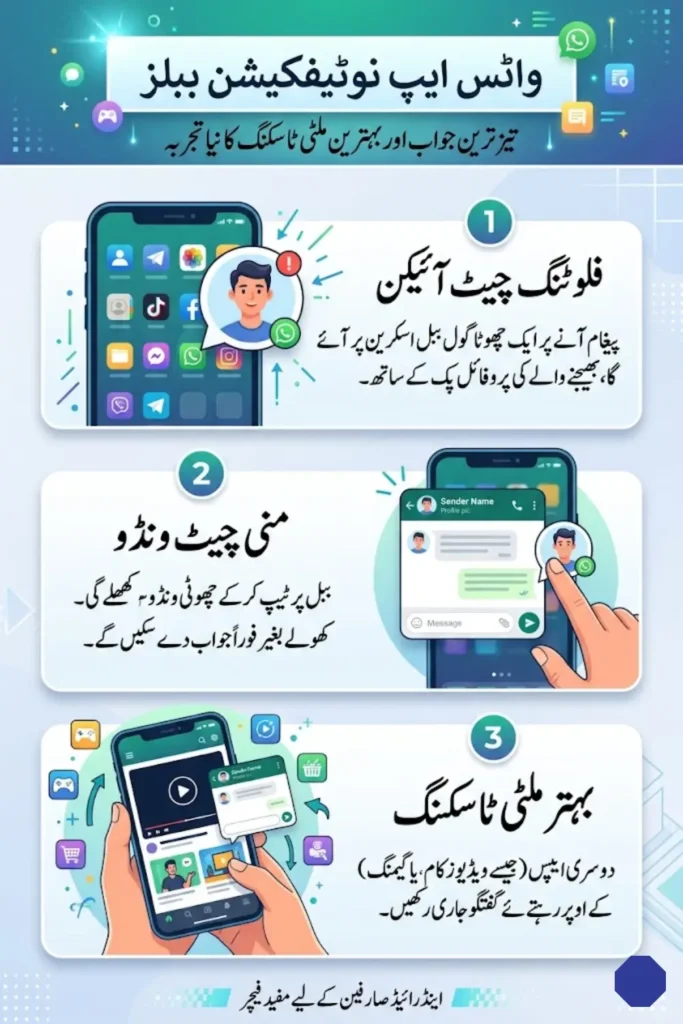
In Pakistan, where WhatsApp is widely used for personal chats, business communication, and even online work, such a feature can bring noticeable convenience. From students attending online classes to shopkeepers managing orders, quick replies without interruption can save both time and effort. This update shows how WhatsApp is adapting to real user needs rather than just adding cosmetic changes.
You Can Also Read: Petrol and Diesel Prices Increased in Pakistan by Rs26.77 Per Litre – New Rates Effective April 25
What Are Notification Bubbles and Why They Matter
Notification bubbles are small floating chat icons that appear on your screen when a message arrives. Instead of opening WhatsApp every time, users can tap on the bubble and access a mini chat window. This feature is already familiar to users of Facebook Messenger, where similar chat heads have been used for years.
You Can Also Read: FBR Increases Customs Values for Imported Used Smartphones
These bubbles are designed to stay visible even when you are using another application. For example, if you are watching a video or scrolling social media, the bubble will appear on top, allowing you to quickly respond without switching apps. This simple change can significantly improve how people interact with messages throughout the day.
- Floating chat icon appears instantly when a message is received
- Shows profile picture along with WhatsApp identification
- Works on top of other apps without interruption
- Inspired by Messenger’s chat head system
How the Notification Bubbles Feature Works on Android
The working of this feature is simple but highly effective. When a new message arrives, a small circular bubble appears on the screen. This bubble contains the sender’s profile picture, making it easy to recognize who has messaged you.
You Can Also Read: FBR Stations Tax Officers Inside Karachi Private Hospital to Monitor Income and Ensure Transparency
Once you tap on the bubble, a compact chat window opens. In this window, you can read messages and reply instantly without opening the full WhatsApp interface. This means users can stay focused on their current activity while still managing conversations.
- Bubble appears for both personal and group chats
- Tap to open a mini chat interface
- Send replies without leaving current app
- Useful during video watching, browsing, or gaming
This feature is particularly helpful for users who receive frequent messages and need to respond quickly without disrupting their workflow.
Benefits of WhatsApp Notification Bubbles for Pakistani Users
For Pakistani users, this feature can bring practical advantages in daily life. Many people rely on WhatsApp not only for communication but also for business transactions, customer support, and freelancing work. Quick replies can improve response time and efficiency.
You Can Also Read: Sindh Government Releases New Guidelines for Private Schools on Fee Collection
In busy urban environments, where people are constantly switching between apps, notification bubbles can reduce unnecessary steps. Instead of opening WhatsApp again and again, users can manage conversations in a more seamless way.
- Faster communication without opening the app
- Better multitasking for work and personal use
- Saves time for students and professionals
- Improves productivity in small businesses
This feature reflects real-world usage patterns, making it more relevant for everyday users.
Android Compatibility and System Requirements
The notification bubbles feature is based on Android’s built-in system, which has supported bubbles since Android 10. However, its performance is expected to be better on newer versions like Android 11 and above.
Users may need to enable this feature manually from their device settings, depending on their smartphone model. Compatibility may vary, especially on older or low-end devices commonly used in Pakistan.
| Feature Requirement | Details |
|---|---|
| Minimum Android Version | Android 10 |
| Recommended Version | Android 11 or newer |
| Activation | May require manual enabling |
| Integration | Works with Android notification system |
This means that while many users will benefit from the feature, some may experience limitations depending on their device.
WhatsApp Interface Changes and Design Improvements
Alongside the notification bubbles feature, WhatsApp is also expected to introduce some changes to its interface. Reports suggest that the app may replace its text-based title with the official logo at the top bar.
This update may seem small, but it indicates a shift towards a cleaner and more modern design. The current layout has remained largely unchanged for years, and this redesign could open the door for additional features in the future.
- App name may be replaced with WhatsApp logo
- Cleaner and more modern interface expected
- Possible space for new features like status integration
Such updates show that WhatsApp is focusing not only on functionality but also on user experience.
Current Testing Phase and Expected Release Timeline
At present, the notification bubbles feature is still under development and not available to the general public. It has been identified in testing phases, which means it will likely be introduced to beta users first.
This approach allows WhatsApp to gather feedback and fix any issues before releasing the feature to all users. Although there is no confirmed release date, it is expected to roll out gradually in the coming months.
- Feature currently in development stage
- Not yet available for public use
- Expected rollout to beta users first
- Full release timeline still unclear
Users who participate in beta testing programs may get early access, while others will need to wait for the official update.
User Control and Customization Options
While notification bubbles offer convenience, not every user may prefer them. Some people may find floating icons distracting, especially if they receive frequent messages throughout the day.
To address this, WhatsApp is expected to provide an option to disable the feature. This ensures that users can choose how they want to interact with their messages.
- Option to enable or disable bubbles
- Suitable for users who prefer minimal interface
- Helps avoid distractions if not needed
- Full control over notification behavior
This flexibility is important, as it allows users to customize their experience according to their needs.
Future of WhatsApp Updates and Messaging Experience
The introduction of notification bubbles highlights WhatsApp’s focus on improving real-time communication. As smartphone usage continues to evolve, features that support multitasking and quick interaction are becoming more important.
For Pakistani users, this update can make everyday communication smoother and more efficient. Whether it is replying to a customer, chatting with family, or managing work conversations, notification bubbles can simplify the process.
In the coming months, WhatsApp is expected to introduce more features that align with modern usage trends. This shows that the platform is not just maintaining its position but actively working to improve the user experience in practical ways.